
Standard Work Combination Sheet (WCS) | Definition & Template
A Standard Work Combination Sheet (also called a work combination table, work combination chart, or standardised work combination sheet) is a lean manufacturing document that shows the sequence and timing of manual work, machine work and walking for one operator through a single cycle. It uses a Gantt-style timeline so human and machine activities can be seen overlapping, with takt time drawn as a vertical line the cycle must finish inside. That overlap is the whole point: it is the one standard work document that answers what the operator is doing while the machine runs, which is what determines whether an operator can tend two machines, absorb an inspection, or is genuinely full. It is one of the three standard work documents, alongside the standard work sheet (layout and flow) and the process capacity table (equipment capability).
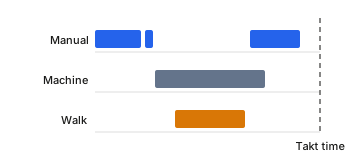
Anatomy of the Chart
- Horizontal timeline
- One cycle from left to right; position shows when, length shows how long.
- Manual line
- Solid — the operator working hands-on.
- Machine line
- Dashed — the automatic cycle running, with or without the operator watching.
- Walk line
- Wavy — operator movement between machines or stations.
- Takt line
- A vertical line the cycle must finish before.
How to Create
- 1
Observe and record one complete cycle
Capture a full cycle at the station, from the moment work starts on a piece to the moment the same point comes round again.
- 2
List every work element in sequence
Order matters here in a way it does not on a Yamazumi chart: the sheet shows what happens when, not just how much.
- 3
Classify each element by type
Manual (operator hands-on), machine (automatic cycle), walk (operator movement) or wait. The overlap between manual and machine is the whole point of the document.
- 4
Measure each element over several cycles and average
One observation cannot separate a normal cycle from an unlucky one.
- 5
Plot on a horizontal timeline, then draw takt
Use a distinct line style per type — solid for manual, dashed for automatic machine time, wavy for walking, by convention — and draw takt time as a vertical line.
To read it: check first whether the operator’s combined manual, tending and walking time finishes before the takt line. Then look at the machine bars — every second the operator stands watching an automatic cycle is available time, and available time is what lets you add work, add a second machine, or remove a person from the cell without anyone working faster. Yamazo Studio generates the sheet from video with multi-track support, so manual, machine, walk and wait times come from what actually happened rather than from estimates.
Example
An operator at a CNC station runs this cycle: load workpiece 12 s manual, start machine 2 s manual, machine cycle 45 s automatic, walk to the inspection bench and check the previous part 30 s (walk plus manual) during that machine cycle, return and unload 15 s manual plus walk. Operator-busy time totals 59 seconds; elapsed cycle time is 74 seconds, because the 30-second inspection hides inside the 45-second machine cycle. Against a 90-second takt the sheet shows 16 seconds of available time, and — more usefully — 15 seconds of the machine cycle where the operator is simply waiting. That idle window is the decision: it is where a second machine, a deburring step or part of a neighbouring station's work can go. Without the combination sheet the station looks like a 74-second cycle and nothing more.
Explore Further
What is Standard Work? | Definition, Benefits & Implementation
What is Takt Time? | Definition, Formula & Calculation
Standard Work Calculator
OEE Calculator
Yamazo Studio for Electronics Assembly | Video Analysis Software
Yamazo Studio for Aerospace & Defense | Video Time Study Software
Yamazo Studio vs Timer Pro Professional | Video Time Study Comparison
Yamazo Studio vs AviX Suite | Time Study & Line Balancing Comparison
Work Measurement Software: The Complete Guide to Labor Standards and Manufacturing Excellence
Video Time Study Software: A Practical Guide for Manufacturing Engineers
Frequently Asked Questions
Take the template with you
We will email you the element time study template — station, element, category and five cycle columns, with worked example rows already filled in. The same email carries the Yamazo Studio demo links, in case you want to measure the same thing from video instead.